

✨Dive in! Learn How To Start Your Journey Now! 💖
FAQs
FAQs
On this page you will find some of the most frequently asked questions
L'Orealistar is an exclusive community for content creators from all L'Oréal Groupe brands. Within the community you can try products and complete missions to earn points in exchange for rewards such as product bundles and invitations to exclusive events and masterclasses
As a member of L'Orealistar, you’ll get the opportunity to try products; new launches and firm favourites, invitations to exclusive events, learn more about our brands, exclusive trend insights and exclusive content upskilling opportunities.
The more activities and missions you complete on the community, the more rewards you will unlock by earning stars. There are four tiers in L'Orealistar: Star, Rising Star, Shooting Star and Supernova. They all unlock incredible rewards such as product bundles, new launches and events.
The more activities and missions you complete on the community, the more rewards you will unlock by earning stars. There are four tiers in L'Orealistar: Star, Rising Star, Shooting Star and Supernova. They all unlock incredible rewards such as product bundles, new launches and events.
You can earn stars by completing missions. These missions can be found in your profile by clicking on your name in the left right corner. Below, you will see a list of all the missions available to you. Each mission will need to be completed separately, two missions cannot be completed using the same post. The more you complete, the bigger the rewards:
- 🎁Rising Star: Pre-selected product bundle and the opportunity to test products from our brands.
- 🎁Shooting Star: Pre-selected product bundle.
- 🎁Supernova: Pre-selected product bundle.
To unlock the opportunity to test products, you need to reach Rising Star level. You only need 90 points to unlock this.
Once you reach Rising Star, you can apply to receive test products in the “Test products” channel in the lefthand menu.
Once you reach Rising Star, you can apply to receive test products in the “Test products” channel in the lefthand menu.
We’re so excited you want to be a part of L'Orealistar ✨
To unlock the opportunity to apply for free products, you need to reach Rising Star level. You only need 90 points to unlock this by completing the missions found in your profile. They’re super simple and shouldn’t take you very much time!
To unlock the opportunity to apply for free products, you need to reach Rising Star level. You only need 90 points to unlock this by completing the missions found in your profile. They’re super simple and shouldn’t take you very much time!
Stars will appear on your profile as you complete missions. Some will appear directly. If they haven’t appeared within 7 days of posting the mission please check the following:
Please include the following information:
If you reach out to us within 7 days you will not be negatively impacted. Continue to complete all your missions, just keep a note of exact mission titles and links to your posts that haven’t received points after you reach out.
- You haven’t edited the post after posting
- You have pressed the "Done! Check my profile!" button
- You have correctly typed in the hashtags (including using the correct capital letters).
If you haven’t done the above correctly, then please delete your current post, and repost the mission with everything done correctly. - Hashtags from multiple missions cannot be added to the same post. If you have added more than one mission’s hashtag, please delete the post and separate the post into 2 posts.
Please include the following information:
- Your L’Orealistar Username/Nickname
- The email address you have linked to your L’Orealistar account
- The title of each mission you haven’t received points for
- A link to the post for each mission
If you reach out to us within 7 days you will not be negatively impacted. Continue to complete all your missions, just keep a note of exact mission titles and links to your posts that haven’t received points after you reach out.
Congratulations! We’re so glad you were able to complete all the missions.
⭐Product bundles will be sent out once per month and it could take up to 8 weeks to be received.
If you have not received your bundle within 6 weeks of reaching the Rising Star status, then please check that your address is filled out and correct. (Please include the country you are in: either UK or Ireland)
Once that is done, then please contact L’Orealistar Support.
When you reach out, we will require the following:
⭐Product bundles will be sent out once per month and it could take up to 8 weeks to be received.
If you have not received your bundle within 6 weeks of reaching the Rising Star status, then please check that your address is filled out and correct. (Please include the country you are in: either UK or Ireland)
Once that is done, then please contact L’Orealistar Support.
When you reach out, we will require the following:
- The exact date you received the new status.
- The status bundle you are waiting for.
- Confirmation you have not received a confirmation email of changing status.
- Confirmation you have checked your address is correct.
- Your L’Orealistar username/nickname.
- The email address linked to your L’Orealistar account.
How exciting, we can’t wait to see how you like these products 😍 Once we’ve selected everyone who will receive the products, we will start sending them out.
Please allow 3 weeks for your products to arrive and we will of course keep you updated along the way!
If you have not received your products within 3 weeks, please contact L’Orealistar Support.
In the email please include the following:
Please allow 3 weeks for your products to arrive and we will of course keep you updated along the way!
If you have not received your products within 3 weeks, please contact L’Orealistar Support.
In the email please include the following:
- The exact date you received the confirmation for receiving the products
- The title of the mission the products are for.
- Confirmation you have checked your address is correct.
- Your L’Orealistar username/nickname.
- The email address linked to your L’Orealistar account
The way to continue increasing points within the community is by completing the missions that you will find in your profile. We’ll be posting new missions for you to complete every week, so there should be something suitable for everyone. Don’t forget to enable email notifications so you can stay up to date with all the new missions and opportunities.
Here is all you need to know to complete your Instagram and TikTok missions.
Our system will scan your social accounts and grant you with points for all the pending missions you’ve correctly completed.
If you have checked that you have completed the above and have not received your points, then please contact L’Orealistar Support. Please include the following information:
- Post on Instagram or TikTok with the required hashtags and mentions indicated in the mission description. To ensure they’re correct, copy and paste directly from the mission.
- Do not modify your social content before receiving your points! This means do not edit anything on your post after posting your mission
- After posting, click on the button "Done! Check my profile!" available in the mission description to validate it. Points can take up to a week to be added.
- The button will be disabled in all your mission descriptions for 5 minutes once clicked.
Our system will scan your social accounts and grant you with points for all the pending missions you’ve correctly completed.
If you have checked that you have completed the above and have not received your points, then please contact L’Orealistar Support. Please include the following information:
- Your L’Orealistar Username/Nickname.
- The email address you have linked to your L’Orealistar account.
- The title of each mission you haven’t received points for.
- A link to the post for each mission.
Our product opportunities are on a first-come-first-serve basis, and the only criteria is that you’re located in the UK.
Go to your profile, under settings (⚙️) > “My profile” and in the notifications section you can activate or deactivate your messages.
Once you sign up for the mission and publish the content in a fixed format (reels, photo or TikTok) with the correct hashtag, it can take time for points to appear on your account. Please note, we cannot validate points for missions submitted as stories; your mission must be completed in a fixed format.
If they haven’t appeared within 7 days of posting the mission please check the following:
If you have checked that you have completed the above, then please contact L’Orealistar Support.
Please include the following information:
If they haven’t appeared within 7 days of posting the mission please check the following:
- You haven’t edited the post after posting.
- You have pressed the "Done! Check my profile!" button.
- You have correctly typed in the hashtags (including using the correct capital letters).
If you have checked that you have completed the above, then please contact L’Orealistar Support.
Please include the following information:
- Your L’Orealistar Username/Nickname.
- The email address you have linked to your L'Orealistar account.
- The title of each mission you haven’t received points for.
- A link to the post for each mission.
If we haven't answered your questions yet, please email outreach@lorealistar-uk.loreal.com. Please share your full nickname and the email used to sign up for the platform. Don't forget to copy and paste the names of any missions or activations that may form part of your query!
Our T&Cs require a minimum of 1,000 followers to link your account. We've found that clearing your browser's cache often fixes any issues. It's like giving your browser a fresh start!
Here's how to do it on different operating systems:
On Windows:
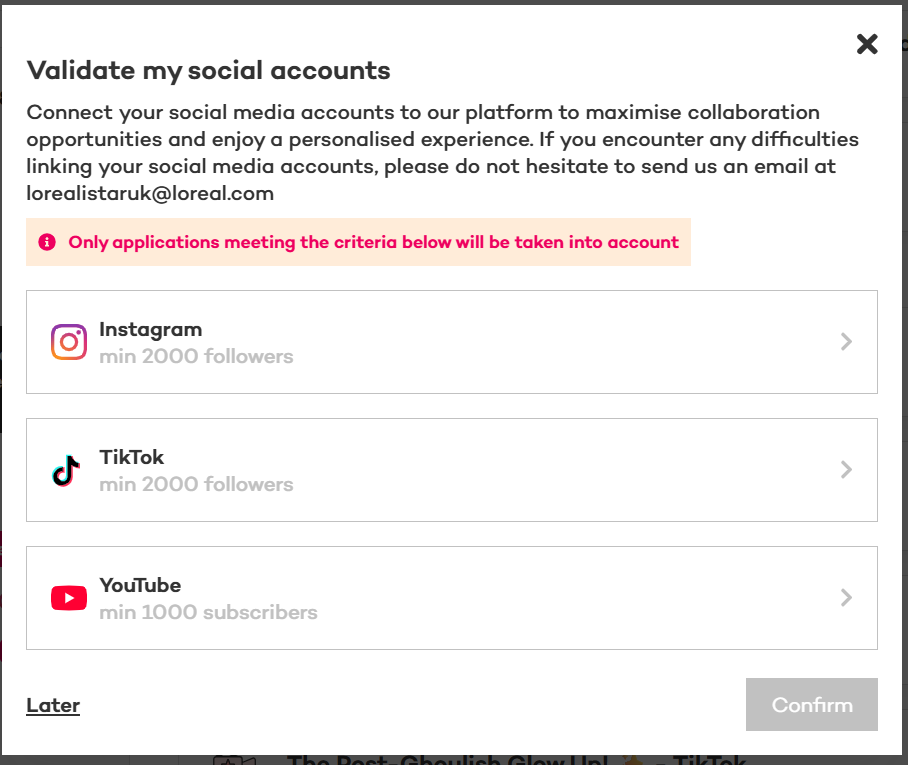
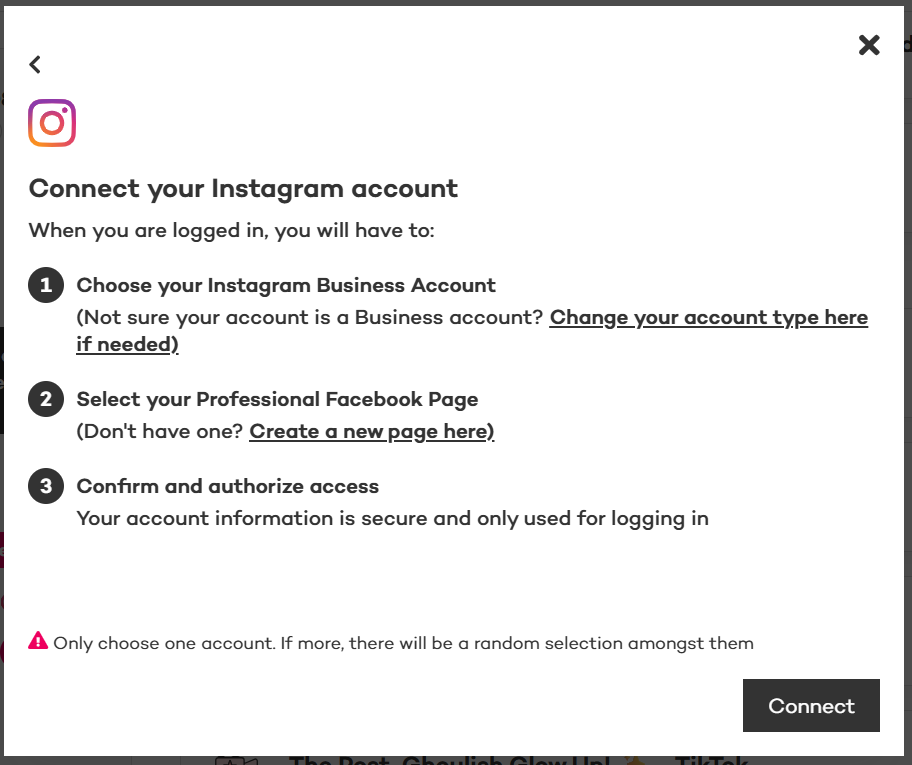
Please note: L’Orealistar is run on a platform called ‘Skeepers’, so don’t worry if you see mention of this when linking your account!
If you get the error message again, please try again on private and another device.
Here's how to do it on different operating systems:
On Windows:
- For most browsers (Chrome, Firefox, Edge): Press Ctrl + Shift + Del to open the "Clear browsing data" menu.
- Make sure the box for "Cached images and files" is checked.
- For the "Time range," select "All time."
- Click "Clear data" or "Clear now."
- Close and reopen your browser.
- For most browsers (Chrome, Firefox): Press Command + Shift + Del to open the "Clear browsing data" menu.
- Make sure "Cached images and files" is selected.
- Choose "All time" for the time range.
- Click "Clear data" or "Clear now."
- Close and reopen your browser
Please note: L’Orealistar is run on a platform called ‘Skeepers’, so don’t worry if you see mention of this when linking your account!
If you get the error message again, please try again on private and another device.
Please contact our support team at: outreach@support-uk.lorealistar.com.
Include the following in your email
Include the following in your email
- Please confirm you have tried all the steps in the FAQs
- What is your L'Orealistar username/nickname?
- What is the email address you used to sign up?
- Is your Facebook page set to business?
- Do you have 1000 followers?
- Please confirm you started at the test products page.
- Please confirm you have attempted on a private browser and a different device.
- Which platforms are you unable to connect?
- Please provide a detailed explanation of the problem.
- Please provide a screenshot of each step of the issue that occurs
For Instagram:
If you are receiving an error message on Instagram or Facebook when linking your accounts then this is an issue with your Instagram or Facebook. Therefore, our tech team is unable to help solve this issue. Please contact Instagram, Facebook or META directly and they should be able to solve these issues.
For TikTok:
If you are receiving an error message on TikTok when linking your accounts then this is an issue with your TikTok. Therefore, our tech team is unable to help solve this issue.
Please contact TikTok directly and they should be able to solve these issues.
If you are receiving an error message on Instagram or Facebook when linking your accounts then this is an issue with your Instagram or Facebook. Therefore, our tech team is unable to help solve this issue. Please contact Instagram, Facebook or META directly and they should be able to solve these issues.
For TikTok:
If you are receiving an error message on TikTok when linking your accounts then this is an issue with your TikTok. Therefore, our tech team is unable to help solve this issue.
Please contact TikTok directly and they should be able to solve these issues.
We love and appreciate every piece of content you create for our missions! When you post content on our platform or on social media for a campaign or mission, you're giving us permission to celebrate and reuse it.
Here’s the breakdown of what you’re confirming when you post:
If you’d like to learn more about our usage rights, check out our full terms and conditions here.
Here’s the breakdown of what you’re confirming when you post:
- You Own It (or have permission): You're confirming that you have the right to post the content. If there's anyone else featured, you've got their OK for us to use their personal data in connection with the content.
- It’s Original: You're confirming that your content doesn't infringe on anyone else's intellectual property rights (like copyrights or trademarks).
- An Ongoing Partnership: You grant us the right and license to use, copy, modify, and share your content. This includes things like marketing, business development, and internal administration.
- Where We Can Use It: We can use your content (and may include your username/name and location with it) across all media, including:
- Online on our websites, social media pages, and all digital platforms.
- In advertising, both online and offline.
- In internal communications within our company.
- For corporate and PR communications and disclosures.
- In retailer and client-facing media (think displays or presentations).
If you’d like to learn more about our usage rights, check out our full terms and conditions here.